Subscriptions & Billing
How plans work
Each product you use is covered by a subscription plan, and every plan starts with a 14-day free trial: enough time to set up your business, add your team, and see how the product fits before you pay for it. Plans differ in which features are unlocked and how much usage is included, for example how many staff accounts, outlets, or transactions a plan allows.
Manage all of this from My Organization → Billing, one tab per product, each showing its active plan and renewal date, or letting you pick one if there isn't one yet:
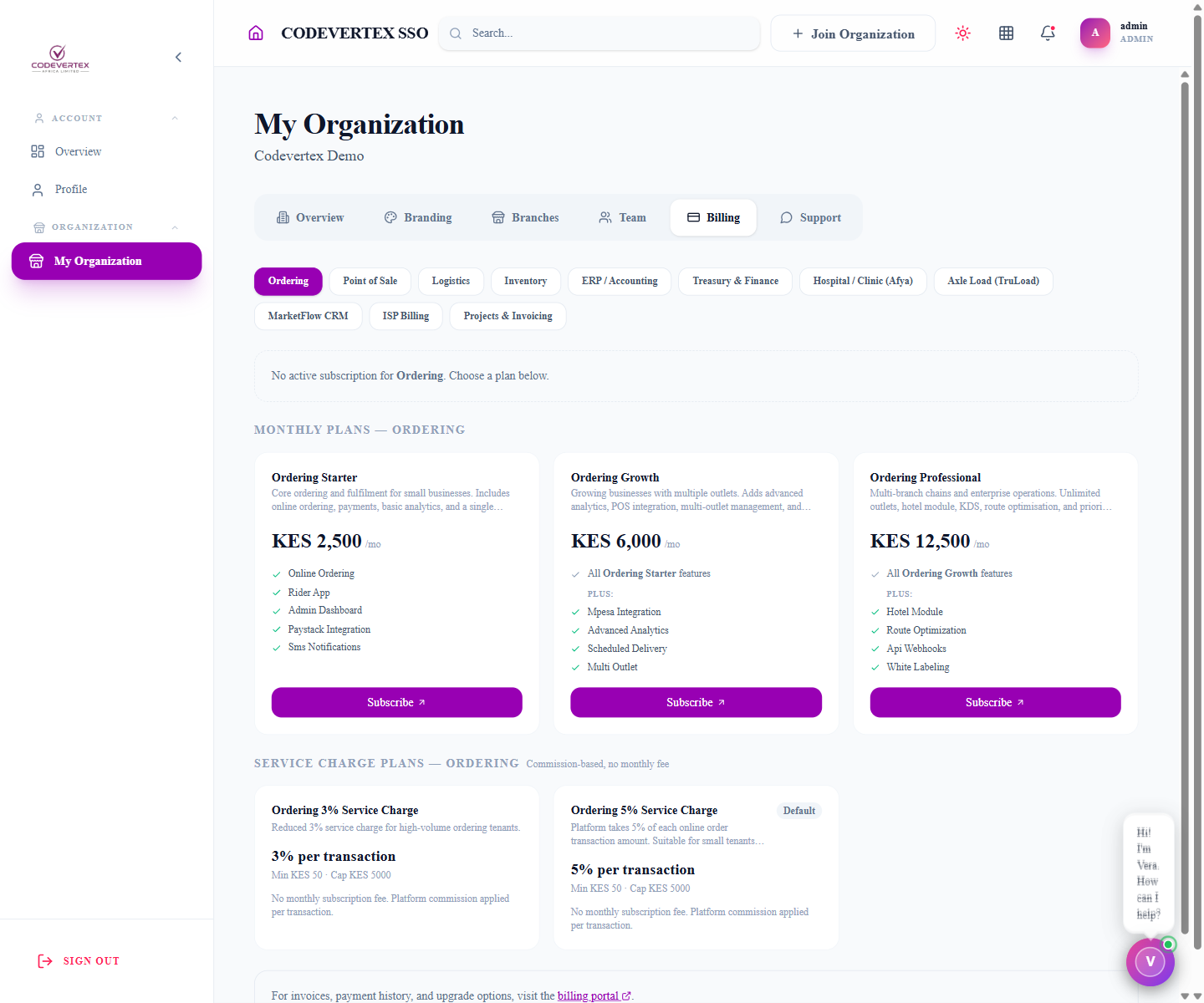
Some products (Ordering, for example) also offer a service-charge option alongside monthly plans: a percentage-of-transaction fee with no fixed monthly cost, useful for a business that would rather pay proportionally to what it actually sells through the platform than a flat rate. Manage on any tab opens the full plans/billing experience for that product; see Managing Your Organisation → Billing for the tab itself.
What happens if a subscription lapses
If a subscription isn't renewed, you won't be locked out of your account or lose access to your data. You can always view your existing records. What changes is that you won't be able to create new records (new sales, new invoices, and so on) until the subscription is active again. This is deliberate: a lapsed payment shouldn't put your historical data at risk or block you from seeing what you already have.
Changing plans
You can move to a different plan as your needs change. Upgrading unlocks new features and higher usage limits right away. Downgrading takes effect at the point your current billing period ends, and if your current usage would exceed the new plan's limits, you'll see a warning before the change goes through, so you're not caught out by a downgrade that suddenly disables something you rely on.
Billing period and payment
You can choose how often you're billed, for example monthly or for a longer period at once. Payment is handled through the platform's payment providers; you'll see the available options at checkout for your region.
One subscription, multiple products
If your organisation uses more than one product, each one is billed according to its own plan. You're not forced into a single bundled price if you only need part of the platform. As your business grows into needing more products, you add their plans as you go.
Add-ons
A small number of features aren't part of any plan tier at all. They're granted to specific accounts directly by Codevertex rather than unlocked by upgrading. Inventory's per-branch/outlet pricing and Aging Stock clearance pricing are examples (see Inventory Administration → Add-ons). If a screen shows an Add-on badge instead of a normal "upgrade your plan" prompt, that's the difference: talk to your account manager rather than looking for a higher tier to buy.
How you're notified
A subscription invoice always arrives with a real, working link to view and pay it, never just an amount and a due date with nothing to click through to (see Message Templates for an example). If it goes unpaid past its due date, you'll get automatic reminders that escalate in tone the longer it stays unpaid, each one still carrying that same direct pay link. See Automatic overdue reminders for exactly how that escalation works. Once payment is confirmed, through checkout or reconciled manually by your account contact, your plan renews and you're notified that it's active again.